
- Official Post

🎯 Counter-Strike 1.6
Full Game Download
🪟 Windows 💿 Classic CS 1.6 Client ✅ Ready to Play
📦 .exe • 214 MB
🔥 Get ready for classic Counter-Strike
Don't have Counter-Strike 1.6 installed? Download a client below and get ready to join the CSOMOD server.
Experience the classic CS 1.6 gameplay you know and love — iconic maps, classic weapons, fast-paced rounds, and lightweight performance that works great even on older PCs.
ℹ️ Before you download: if you already have a working Counter-Strike 1.6 installation, there's no need to download another client.
📥 Download Counter-Strike 1.6
Choose the download mirror below.
💾 214 MB | 🖥️ Windows | 📁 Full Game Installer | 🎯 Counter-Strike 1.6
🛠️ How to install
- Download the CS 1.6 installer using the button above.
- Run CS16_Setup_2241.exe after the download finishes.
- Choose your installation folder. Example: C:\Games\Counter-Strike 1.6
- Select your preferred interface language.
- Complete the installation. You can select Launch Counter-Strike 1.6 when prompted.
- Connect to the CSOMOD server and start playing!
💻 System requirements
Counter-Strike 1.6 is lightweight and can run comfortably on very modest hardware.
| Component | Minimum | Recommended |
|---|---|---|
| CPU | 500 MHz | 1 GHz+ |
| RAM | 96 MB | 256 MB+ |
| Storage | 400 MB free | 500 MB free |
| GPU | 16 MB video card | 64 MB dedicated |
| OS | Windows XP / Vista / 7 | Windows 10 / 11 |
🔗 Connect to CSO #1
Already installed CS 1.6? Connect directly using the console.
Server IP connect 81.181.244.5:27015 | Server DNS connect server.csomod.com:27015 |
How to connect: launch Counter-Strike 1.6, press ~ to open the console, enter one of the commands above, and press Enter.
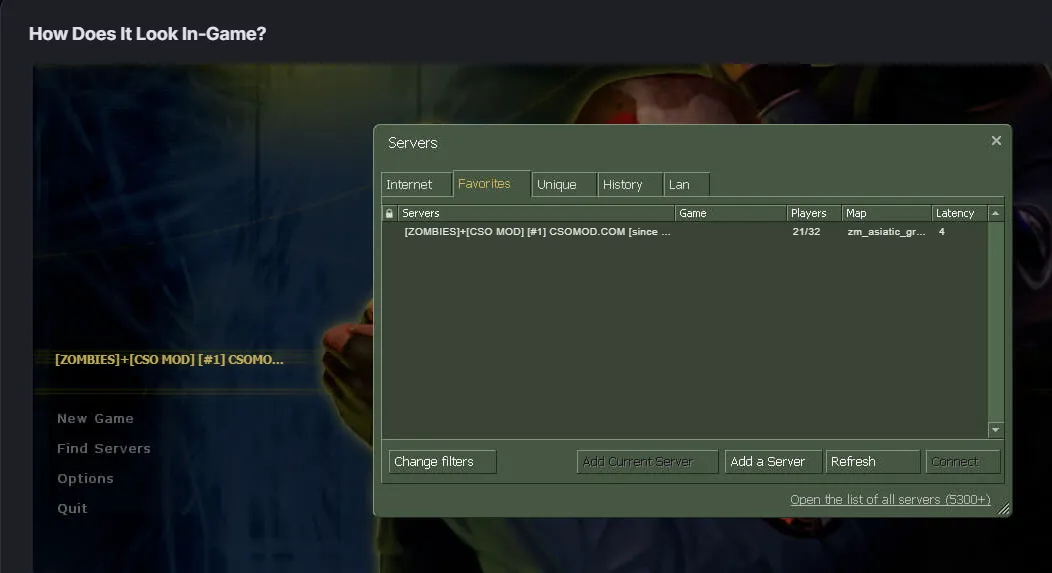
You can also join the server from your Favorites through the in-game server browser or Game Menu for quick access.
🎯 Ready to play?
Install Counter-Strike 1.6, connect to CSO #1, and join the fight!
🔥 See you on CSO #1! 🎮