Unable to connect to Steam Problem

  • Hey everyone, just wanted to give you an update regarding the Steam connectivity issue some players have been experiencing recently.

    From the last Half-Life update, I keep getting kicked from the servers  because of ,,Unable to connect to Steam'' and I am litterally connected to  steam any help? : r/counterstrike

    I contacted our host about the problem, as several players have reported that they are getting an error when trying to play on our server. What makes this a bit unusual is that some of the affected players are able to play on other servers through Steam without any issues, while the problem only occurs on our server.

    Our host confirmed that another server has also reported a similar issue, so at this point it looks more like a networking/transit problem rather than something specific to individual players or their PCs. They suspect it could be related to the network path between OVH and Akamai/Steam, as there have been similar routing issues in the past.

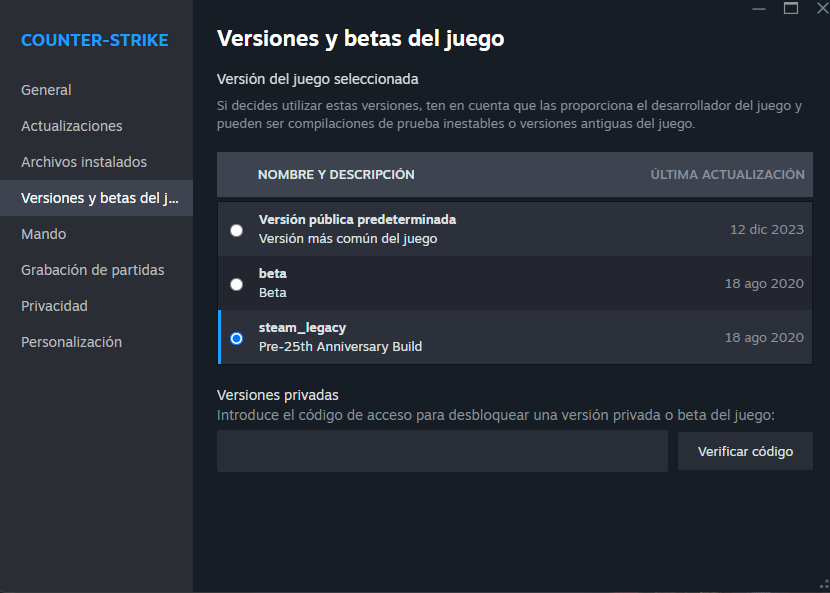
    We also tried recommending the Legacy version as a workaround, but unfortunately that doesn't seem to solve the issue for everyone.

    As a temporary workaround, if you are unable to connect through Steam, you can also try using the non-Steam version of CS 1.6. This may allow you to play while the Steam connectivity issue is being investigated. Of course, this is only a temporary workaround and not a permanent solution.

    For now, there is no confirmed fix yet. The host is looking into what exactly might be getting blocked or affected on the network side, and they will be monitoring for any changes and updates.

    I know this is frustrating, especially for players who are unable to play while other servers work normally. I'm keeping in contact with the host and will let everyone know as soon as I receive any new information or if a proper solution is found.

    Thanks for your patience and understanding

  • Go to Best Answer
  • Post by Carbon (August 23, 2026 at 9:15 PM).

    This post was deleted by the author themselves (August 24, 2026 at 1:11 AM).
  • i need pcap files whose getting unable to connect to steam (network packets)

    you can download wireshark from https://www.wireshark.org/#download and choose your network adapter and it will start capturing then you can join to our server and wait for unable to connect to steam kick after that you can stop capture and save it then you can upload that .pcap file to somewhere and send me link of it

  • Please also make sure you are using our new server IP: 81.181.244.5:27015, not the old 135.125.249.130:27015.

    The old IP is only used for redirection to the new server, so it may potentially be causing the issue.

    For anyone experiencing this problem, please try the following first:

    1. Use the Steam CS 1.6 Legacy version.
    2. Connect directly using the new IP: 81.181.244.5:27015 or DNS: server.csomod.com:27015.
    3. If you were previously using the old IP, make sure you switch to the new one.

    This should help determine whether the issue is related to the old IP/redirect.

    How to Switch Between the New and Legacy Version of CS 1.6

    Steam Community :: Guide :: Switch Between the New and Legacy Version of CS 1.6
    📌 About This Guide This guide explains how to switch Counter-Strike 1.6 from the new updated version (the one released after the Half-Life 25th Anniversary…
    steamcommunity.com

    🔍Why Did the Default CS 1.6 Version Change?

    Valve released the Half-Life 25th Anniversary Update, which included major changes to the GoldSrc engine.
    Because CS 1.6 uses the same engine, the update automatically applied to Counter-Strike as well.

    This means:
    the default version behaves differently than the old classic build,
    some old servers and AMX plugins may break,
    many players prefer the original gameplay feel.
    To fix this, Valve added a separate branch: steam_legacy – Pre-25th Anniversary Build

    🟨 How to Switch to the Legacy Version

    Open Steam.

    • 1.Go to your Library.
    • 2. Find Counter-Strike 1.6.
    • 3. Right-click → Properties.
    • 4. Go to the Betas tab.
    • 5. In the drop-down menu select: steam_legacy – Pre-25th Anniversary Build
    • 6. Wait for Steam to download the old files.
    • 7. (Optional but recommended) →Properties → Local Files → Verify integrity of game files…
    • 8. Launch the game.
    • 9. You are now running the classic version.

    🟧 How to Switch Back to the Normal Version

    • Repeat steps 1–4.
    • In the Betas tab, select:
    • NONE – Opt out of all betas
    • Let Steam download the new version.
    • (Optional) run Verify integrity again.
    • You are now back on the current updated build
  • Carbon August 25, 2026 at 3:03 PM

    Selected a post as the best answer.
    • Best Answer
    • Official Post

    Steam Connection Issue – Important Server Update

    For anyone currently experiencing the “Unable to connect to Steam” error when trying to connect to our server, please make sure you are using our new server address.

    The old IP address may no longer work correctly for some users and can result in connection or Steam authentication errors. I personally experienced the same issue when connecting through the old IP, but after switching to the new server address, the problem was resolved and I was able to connect successfully.

    You can connect using either of the following:

    New IP: 81.181.244.5:27015

    DNS: server.csomod.com:27015

    If you are currently using the old IP and receiving the “Unable to connect to Steam” error, please update your saved server address and try connecting again using one of the addresses above.

    We recommend using the DNS address whenever possible:

    server.csomod.com:27015

    Using the DNS address is preferable because it can remain consistent even if the server's underlying IP address changes in the future. This means you won't necessarily need to update your connection details again if the server IP is changed.

    If you continue to experience connection problems after switching to the new address, please restart your game and Steam client and then try connecting again.

    Thank you for your understanding, and please make sure you are using the updated server address when connecting.

  • Carbon August 26, 2026 at 12:29 AM

    Closed the thread.
  • Carbon August 26, 2026 at 12:29 AM

    Selected a post as the best answer.
  • Carbon August 26, 2026 at 12:29 AM

    Removed the label Important

Participate now!

Don’t have an account yet? Register yourself now and be a part of our community!